How to Choose the Right Graphics Card for Your Gaming PC
Practical guide to selecting a GPU for gaming: match your monitor resolution, budget and performance needs with the right NVIDIA RTX or AMD Radeon card.
Finding the Right GPU for Your Setup
Choosing a graphics card is one of the most important decisions when building or upgrading a gaming PC. The GPU determines how smoothly your games run, which visual settings you can enable, and how long your system remains capable. With dozens of models from NVIDIA and AMD on the market—ranging from budget options to flagship powerhouses like the RTX 5090 and Radeon RX 9070 XT—it's easy to feel overwhelmed.
This guide walks you through the process step by step: defining your needs based on monitor resolution and the games you play, understanding which GPU specifications actually matter, comparing current architectures, and ensuring your system can support the card you choose. Whether you're building your first gaming rig or upgrading an existing setup, you'll learn how to find the right balance between performance and budget without paying for features you won't use.
Define Your Gaming Requirements
Start by answering three questions: what resolution is your monitor, what frame rate do you want, and which games will you play? A 1080p display needs far less GPU power than a 4K screen. If you're aiming for smooth 60 FPS in story-driven games, a mid-range card will suffice; competitive players targeting 144 FPS or higher in esports titles need more performance.
List the most demanding games in your library—recent AAA releases with ray tracing, open-world titles, or simulation games. Check their recommended GPU specifications and use that as a baseline. If you plan to keep the card for several years, consider upcoming releases and factor in some headroom. A card that barely meets today's requirements will struggle with next year's games.
Don't forget about additional workloads. If you stream, record gameplay, or edit videos, look for GPUs with dedicated encoding hardware (NVIDIA's NVENC or AMD's VCE). For VR gaming, prioritize models with strong sustained performance and low frame-time variance. Knowing your use case upfront prevents expensive mismatches later.
Understanding GPU Specifications
VRAM capacity is the most visible spec and often misunderstood. For 1080p gaming, 8 GB is the minimum today; 1440p benefits from 12 GB, and 4K or high-resolution texture packs demand 16 GB or more. VRAM type matters too—GDDR6X offers higher bandwidth than standard GDDR6, reducing bottlenecks at high resolutions. Don't ignore memory bus width: a 256-bit or wider bus ensures the GPU can actually use all that VRAM efficiently.
Core counts—CUDA cores for NVIDIA, stream processors for AMD—indicate raw parallel processing power, but architecture matters more than numbers. A newer-generation card with fewer cores often outperforms an older one with more, thanks to efficiency improvements and higher clock speeds. Boost clock frequency tells you the peak speed the GPU reaches under load; effective cooling keeps it there longer.
TDP (thermal design power) shows how much heat the card produces and how much power it draws. High-end GPUs like the RTX 5090 can exceed 450 watts, requiring robust power supplies and airflow. Lower TDP doesn't always mean worse performance—it can indicate better efficiency. Compare performance-per-watt if you care about electricity costs or system noise.
NVIDIA RTX vs AMD Radeon: Architecture Comparison
NVIDIA's RTX 5090, RTX 5080, and RTX 5070 Ti represent the current Blackwell generation, offering strong ray tracing performance through dedicated RT cores and AI-accelerated upscaling via DLSS (Deep Learning Super Sampling). DLSS uses tensor cores to render frames at lower resolution and intelligently upscale them, boosting frame rates with minimal visual loss. Ray tracing—realistic lighting and reflections—is more performant on RTX cards than on most AMD equivalents, though it still demands significant GPU resources.
AMD's Radeon RX 9070 XT and other RDNA-based cards compete on price-to-performance in rasterization workloads (traditional rendering without ray tracing). AMD's FSR (FidelityFX Super Resolution) is an open upscaling technology that works on any modern GPU, but FSR 2 and 3 don't rely on dedicated AI hardware, so the quality and performance uplift differ from DLSS. AMD cards often deliver more VRAM at a given price point, which helps with future-proofing and high-resolution textures.
If your favorite games heavily use ray tracing or support DLSS, NVIDIA cards provide smoother experiences. If you prioritize raw rasterization performance per dollar and prefer open-source driver support, AMD is competitive. Check benchmarks for the specific titles you play—GPU performance varies by game engine and API (DirectX 12, Vulkan).
Power Supply, Cooling, and Physical Fit
A high-performance graphics card is useless if your power supply can't feed it. Check the GPU's recommended PSU wattage—manufacturers list this in the spec sheet—and verify your unit meets or exceeds it with at least 100 watts of headroom. Modern flagship cards require PCIe 5.0 power connectors (12VHPWR) or multiple 8-pin PCIe cables; confirm your PSU has the right connectors or budget for an adapter.
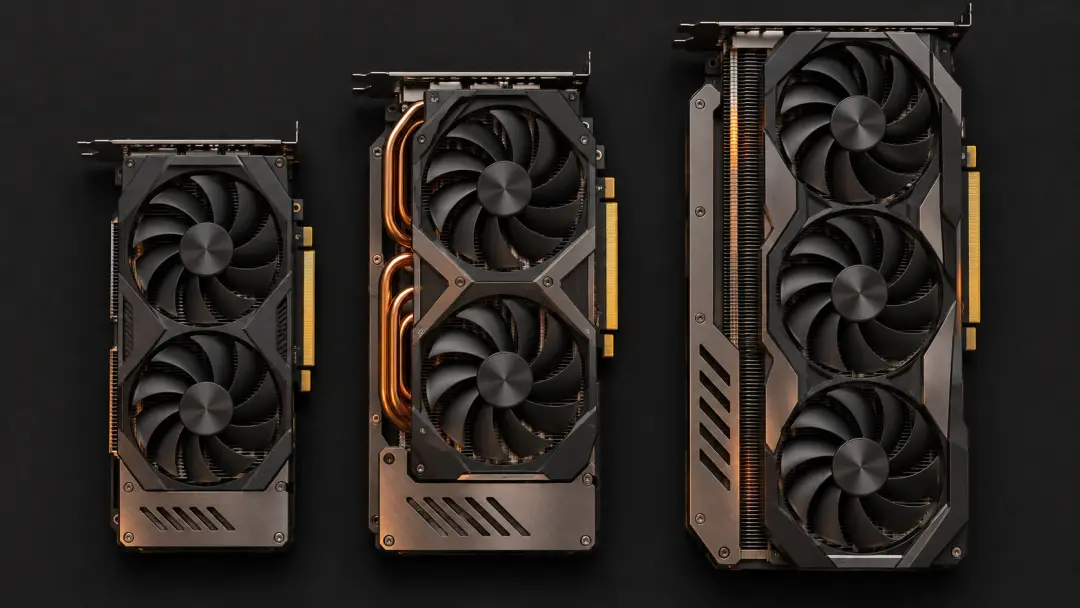
Measure your case before buying. GPU length, width (slot count), and thickness vary widely; triple-fan coolers on cards like the RTX 5090 can exceed 300 mm in length and occupy three expansion slots. Check clearance around the motherboard, RAM, and front-mounted radiators. Adequate airflow is critical—hot GPUs throttle and lose performance. If your case is cramped or poorly ventilated, consider a model with a more efficient cooler or plan case upgrades.
Motherboard PCIe slot compatibility is rarely an issue—PCIe 4.0 and 5.0 are backward compatible—but older PCIe 3.0 systems may slightly bottleneck the fastest cards at very high resolutions. More importantly, ensure your CPU won't be a limiting factor. Pairing a flagship GPU with an aging processor creates a CPU bottleneck where the graphics card sits idle waiting for the CPU to prepare frames.
Balancing Budget and Timing Your Purchase
GPU pricing fluctuates with supply, demand, and product cycles. New flagship launches—like the RTX 5080 or RX 9070 XT—push previous-generation cards down in price, creating opportunities to buy last year's high-end model at mid-range cost. Monitor weekly special offers and compare price-to-performance across generations; sometimes a discounted older card delivers better value than the latest release.
Avoid paying for features you won't use. If you game at 1080p 60 FPS, a flagship card is overkill—save money and put it toward a better monitor, more storage, or other components. Conversely, skimping on the GPU when building a system around a high-refresh 1440p or 4K display wastes the monitor's potential. Match the card to your actual setup and usage.
If you're unsure which model fits your needs, online retailers like Mindfactory often provide comparison tools and detailed specifications for current graphics cards, power supplies, and cooling solutions. Their PC configurator can help you verify component compatibility before purchase, and professional assembly services ensure everything fits and runs correctly out of the box. For personalized advice on choosing a graphics card for your specific gaming requirements, use the contact form to reach their support team.
Frequently Asked Questions
How much VRAM do I need for gaming?
For 1080p, 8 GB is the minimum; 1440p gaming benefits from 12 GB, especially in texture-heavy or ray-traced titles. 4K and future-proofing call for 16 GB or more. VRAM needs grow over time as games increase texture resolution and complexity.
Is ray tracing worth the performance cost?
Ray tracing improves visual realism—reflections, shadows, global illumination—but can halve frame rates without upscaling. If you have an RTX card with DLSS or an AMD card with FSR, the performance hit is manageable. Whether it's worth it depends on how much you value visual fidelity over raw frame rate.
Should I buy a new GPU now or wait for the next generation?
If your current card meets your needs, waiting often yields better performance per dollar. If you're building a new system or your GPU is several generations old, buy now—there's always something newer on the horizon. Watch for discounts when new models launch, as previous-generation cards drop in price.
Can I upgrade just the GPU, or do I need a new power supply too?
Check your PSU's wattage and available connectors against the new GPU's requirements. Mid-range cards often work with existing 550–650 W units, but high-end models like the RTX 5090 may need 850 W or more with the correct PCIe power cables. Factor PSU upgrades into your budget if necessary.