RTX 5090 vs RTX 5080: Which NVIDIA GPU Should You Buy?
Detailed comparison of NVIDIA's flagship Blackwell GPUs: performance, power draw, cooling needs and price. When RTX 5090 makes sense and when RTX 5080 is enough.
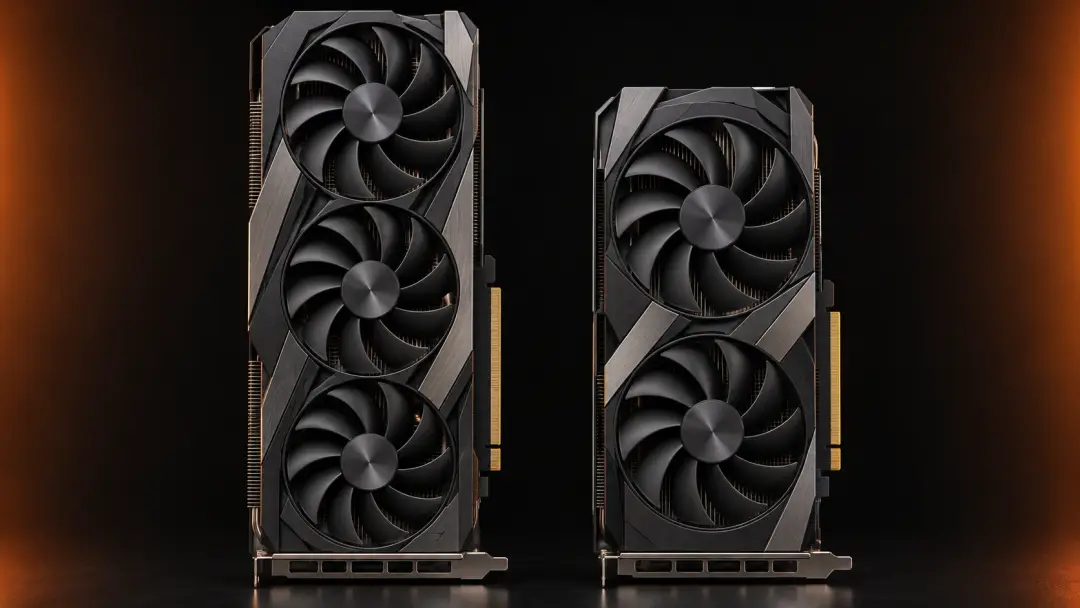
NVIDIA's Blackwell architecture brings two flagship GPUs to the table: the RTX 5090 and the RTX 5080. Both promise substantial gains over the previous generation, yet the performance gap, price difference and system requirements set them apart in ways that matter for real-world use. Choosing between them means weighing raw frame rates against power bills, case compatibility and whether you actually need every extra frame per second.
The RTX 5090 sits at the top of the consumer stack, aimed squarely at those who refuse compromise—gamers targeting 4K at 120 fps and above, content creators running heavy rendering or AI workloads. The RTX 5080 arrives as the more pragmatic pick, delivering strong 4K performance without the extreme power draw or price tag. This comparison unpacks the specifications, real gaming performance, power and cooling requirements, price positioning and system compatibility to help you decide which card fits your needs.
Architecture and Specifications
The RTX 5090 uses NVIDIA's GB202 die with around 21,760 CUDA cores, a 512-bit memory bus and 32 GB of GDDR7 VRAM running at 28 Gbps. Base clock sits near 2.0 GHz, with boost frequencies exceeding 2.6 GHz under optimal cooling. Memory bandwidth reaches approximately 1.8 TB/s, giving the card ample headroom for high-resolution textures and complex ray tracing scenes.
The RTX 5080 steps down to the GB203 die with roughly 10,752 CUDA cores, a 256-bit bus and 16 GB of GDDR7 at 28 Gbps. Boost clocks land in a similar range to the 5090, but the narrower bus and halved VRAM capacity mean memory bandwidth settles around 896 GB/s. Both cards support DLSS 4 with multi-frame generation, PCIe 5.0 and DisplayPort 2.1, so feature parity is intact—the difference lies in scale.
On paper, the RTX 5090 doubles the core count and memory capacity of the 5080, but real-world performance scaling rarely mirrors theoretical specs. The 5080's tighter power envelope and smaller die make it easier to cool and integrate into mainstream builds, while the 5090 demands more robust infrastructure.
Gaming Performance at 4K
At 4K resolution with ray tracing enabled, the RTX 5090 typically leads by 30 to 40 percent in demanding titles. In games like Cyberpunk 2077 with path tracing, the 5090 can hold 90 to 110 fps with DLSS 4 Quality mode, while the 5080 delivers 65 to 80 fps under the same settings. The gap widens in memory-intensive scenarios—open-world games with high-resolution texture packs, or titles that lean heavily on ray tracing, favor the 5090's larger VRAM buffer and bandwidth.
For gamers targeting 4K 60 fps, the RTX 5080 handles the vast majority of titles comfortably. Even with ray tracing and DLSS, frame rates stay above 60 in most cases. The extra cost of the 5090 pays off when you want 4K 120 fps or higher, or when you play at ultrawide resolutions where the additional compute and memory become necessary to maintain smooth performance.
DLSS 4 with multi-frame generation benefits both cards, but the 5090's higher native frame rate means the multiplier effect lands you further up the refresh-rate curve. If your monitor caps at 4K 60 Hz, the 5080's performance is sufficient. If you own a 4K 144 Hz display or plan to upgrade, the 5090 makes more sense.
Power Draw and Cooling Requirements
The RTX 5090 carries a TDP around 450 to 500 watts, depending on the partner model and factory overclock. NVIDIA recommends a 1000-watt power supply with dedicated PCIe 5.0 12VHPWR connectors. In practice, a quality 850-watt unit can work if the rest of your system is efficient, but headroom matters—transient power spikes can exceed rated TDP by 20 percent or more.
The RTX 5080 sits at roughly 320 to 350 watts TDP. A 750-watt PSU is the official recommendation, though many builders run it successfully on 650 watts with a modern, efficient unit. Both cards use the 12VHPWR connector, so ensure your power supply includes the native cable or a reliable adapter. Avoid daisy-chaining older PCIe 8-pin connectors; stability and safety both improve with a proper single cable.
Cooling the RTX 5090 requires a case with strong airflow or a custom water loop. Three-fan designs measure 320 mm or longer and occupy 3.5 to 4 slots, leaving little room in compact cases. The 5080 typically spans 300 to 310 mm and fits into more standard mid-tower layouts. If your case has restricted clearance or weak ventilation, the 5080's lower heat output simplifies thermal management.
Price and Value Proposition
Launch pricing for the RTX 5090 hovers around 2,000 euros or more, while the RTX 5080 starts near 1,200 euros. The 5090 costs roughly 65 percent more for a 30 to 40 percent performance gain, making it a poor value proposition on a pure frames-per-euro basis. That calculation shifts if your workload extends beyond gaming—3D rendering, AI training, video editing and other GPU-accelerated tasks benefit from the extra VRAM and compute, narrowing the value gap.
For gamers who play at 4K 60 fps and occasionally dabble in ray tracing, the RTX 5080 delivers nearly everything the 5090 offers at a substantially lower cost and with easier system integration. The 5090 makes sense if you need every frame for competitive play at high refresh rates, run productivity workloads that saturate VRAM, or simply want the fastest card available regardless of diminishing returns.
Market availability also plays a role. The RTX 5090 often sells out quickly, and third-party markups can push prices even higher. The 5080 tends to stay in stock more consistently, making it the pragmatic choice when budget or availability is a constraint.
System Compatibility and Bottlenecks
Both cards pair best with high-end processors—an Intel Core i7 or i9 from the 13th or 14th generation, or an AMD Ryzen 7 or 9 from the 7000 or 9000 series. At 4K resolution, CPU bottlenecks are less pronounced than at 1080p, but a weak processor can still limit frame rates in CPU-bound games or when DLSS pushes frame rates high enough that the CPU becomes the choke point.
Memory matters too. 32 GB of DDR5 RAM is recommended for both cards, especially if you run background applications or stream while gaming. Motherboard choice should account for PCIe 5.0 support and sufficient power delivery—older boards may lack the necessary connectors or robust VRM cooling to handle a high-power GPU alongside a modern CPU.
Case dimensions are critical for the RTX 5090. Measure clearance for length, width and slot height before purchasing. Many popular mid-tower cases accommodate the 5080 without issue but struggle with the 5090's bulk. If you plan to upgrade other components later, ensure your case and power supply can handle the combined load.
Frequently Asked Questions
Is the RTX 5090 worth the extra cost over the RTX 5080?
Only if you need 4K gaming above 100 fps, work with GPU-accelerated content creation, or want the absolute fastest card regardless of value. For most gamers targeting 4K 60 fps, the RTX 5080 offers better price-to-performance.
Can I run the RTX 5090 on a 850-watt power supply?
A high-quality 850-watt unit can work if the rest of your system is efficient, but a 1000-watt PSU provides safer headroom for transient spikes and future upgrades. Always use a proper PCIe 5.0 12VHPWR cable.
Does the RTX 5080 have enough VRAM for 4K gaming?
16 GB handles the vast majority of current games at 4K, even with high-resolution texture packs. A few outliers may push closer to the limit, but DLSS and texture streaming keep VRAM usage manageable in most scenarios.
Which card is better for ray tracing?
The RTX 5090 leads in ray tracing due to higher core count and memory bandwidth, delivering 30 to 40 percent more performance in path-traced titles. The RTX 5080 still handles ray tracing well at 4K 60 fps with DLSS enabled.