Why Use a PC Configurator and Professional Assembly Service
Learn how PC configurators ensure component compatibility and why professional assembly saves time while delivering tested, cable-managed gaming systems ready to run.
Understanding PC Configuration and Assembly Services
Building your first gaming PC or upgrading to a high-end system can feel overwhelming. Will the graphics card fit in the case? Does the power supply have the right connectors for an RTX 5090? Will that CPU cooler clear your RAM modules? These questions multiply quickly, and a single compatibility mistake can mean returns, delays, or even damaged components.
PC configurators paired with professional assembly services solve these problems by automating compatibility checks and handing the build process to experienced technicians. This combination is especially valuable when choosing modern high-power components like NVIDIA RTX 5000-series or AMD Radeon RX 9070 XT graphics cards, where power delivery, physical clearance, and cooling requirements are more demanding than ever.
Whether you are building your first system or assembling a complex configuration with custom cooling, understanding what these services offer helps you decide when professional assembly is worth the investment.
Common Problems When Building a PC Yourself
Self-building gives you full control and can be satisfying, but it comes with real risks. Socket incompatibility between CPU and motherboard is one of the most common mistakes—buying an Intel processor for an AMD board or choosing a CPU generation the motherboard BIOS does not support out of the box. These errors are not always obvious until you have already opened the packaging.
Physical fit issues create another layer of complexity. Modern flagship graphics cards like the RTX 5090 can exceed 300mm in length and occupy three or more expansion slots. If your case cannot accommodate that size or your CPU cooler blocks the top PCIe slot, you will need to return parts and start over. RAM clearance under tower coolers, radiator mounting space for liquid cooling, and power supply depth all require careful measurement.
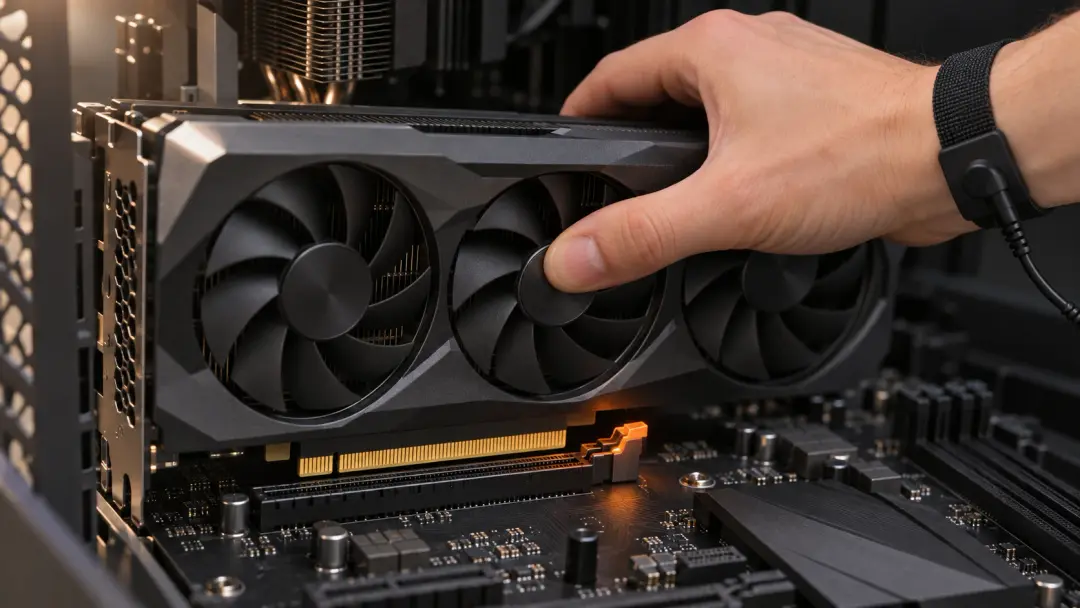
Handling sensitive components without proper grounding increases the risk of electrostatic discharge damage. Incorrect CPU or cooler installation can bend pins or create poor thermal contact, leading to overheating. Cable management mistakes such as blocking airflow or placing cables near hot components reduce cooling efficiency. Even after a successful physical build, diagnosing a system that does not POST—no video output, no beep codes—can take hours of troubleshooting for someone without experience.
How a PC Configurator Ensures Compatibility
A PC configurator is an interactive tool that guides you through component selection while automatically checking compatibility rules in the background. When you choose a processor, the configurator filters motherboard options to show only models with the correct socket and chipset. Select a graphics card, and the system verifies that your chosen case has enough length and slot clearance to fit it.
Power supply validation is especially important with current-generation GPUs. The configurator calculates total system power draw based on your CPU, graphics card, storage devices, and cooling, then recommends a PSU with adequate wattage and the correct PCIe power connectors—typically 12VHPWR for RTX 5000-series cards. This prevents underpowered or incorrectly connected systems that can cause crashes or throttling under load.
As you add components, the configurator displays a running total of the system cost, making it easy to adjust your build to fit your budget without sacrificing compatibility. This transparency helps you compare options—such as choosing between an RTX 5080 and RTX 5090—while seeing the immediate price impact and ensuring every part works together.
What Professional Assembly Delivers
Once you finalize your configuration, professional assembly takes over the physical build. Experienced technicians handle component installation using proper grounding and handling procedures, reducing the risk of damage from static discharge or mishandling. CPU installation, cooler mounting with correct thermal paste application, and RAM seating are performed with attention to detail that minimizes the chance of poor contact or mechanical stress.
Cable management is one area where professional builders make a visible difference. Clean routing keeps cables away from fans and hot components, improves airflow through the case, and makes future upgrades easier. Technicians secure cables with ties and route them through designated channels, avoiding the tangled mess that often results from a first-time build.
Before shipping, professionally assembled systems undergo testing. This typically includes POST verification to confirm that the system powers on and recognizes all components, followed by stress tests to check stability under load. Technicians verify that temperatures remain within safe ranges and that the system runs without crashes or artifacts. If an issue appears during testing, it is diagnosed and resolved before the PC leaves the facility—eliminating the frustration of receiving a non-functional system and having to troubleshoot remotely.
Warranty and Support Advantages
When you build a PC yourself, each component carries its own manufacturer warranty. If something goes wrong, you must diagnose which part failed, contact the correct manufacturer, and handle the return process individually. This can be time-consuming and frustrating, especially when a fault is intermittent or caused by interaction between components rather than a single defective part.
Professionally assembled systems often come with a unified warranty covering the entire build. If the system develops a problem, you contact one support team rather than juggling multiple manufacturers. The company that built the system takes responsibility for diagnosing the issue and coordinating any necessary repairs or part replacements, simplifying the support process significantly.
Support teams familiar with the configurations they sell can also provide faster troubleshooting. Because they built the system and tested it before shipping, they have baseline knowledge of its expected behavior and can identify deviations more quickly than a third-party support agent working from generic documentation.
Who Should Use a Configurator and Assembly Service
First-time builders benefit the most from this combination. Without prior experience, it is difficult to anticipate compatibility issues or know which components require special attention during installation. A configurator removes the guesswork from part selection, while professional assembly ensures correct installation and a working system from day one.
Complex configurations also favor professional assembly. Custom liquid cooling loops, systems with multiple storage drives and expansion cards, or builds using large cases with intricate cable routing all take significant time and expertise to execute well. If you are building a high-end workstation or gaming rig with these features, paying for professional assembly can be more cost-effective than spending multiple evenings troubleshooting and refining the build yourself.
Even experienced builders sometimes choose assembly services when time is limited. If you need a new system operational quickly for work or an upcoming game release and do not have the hours required for a careful build and testing process, professional assembly delivers a ready-to-use PC without the time investment.
Frequently Asked Questions
Does professional assembly cost significantly more than building myself?
Assembly fees vary but typically represent a small percentage of the total system cost—often comparable to the value of the time you would spend building and testing the PC yourself. For complex builds or first-time builders, the fee is often justified by reduced risk of errors and the included pre-delivery testing.
Can I upgrade a professionally assembled PC later?
Yes. Professionally assembled systems use standard components and are built for future upgrades. Clean cable management and proper assembly actually make upgrades easier than in many self-built systems. You can add storage, upgrade the graphics card, or replace the CPU just as you would in any custom PC.
How long does professional assembly and testing take?
Turnaround depends on the company and current order volume. Assembly itself typically takes a few hours, but scheduling, parts availability, and thorough testing can extend the process to several business days. This is still faster than the time many first-time builders spend troubleshooting a build that does not work on the first attempt.
What if I want to choose specific brands for components like RAM or storage?
Most configurators allow you to select between multiple brands and models for each component category, giving you control over specifics like RGB lighting, storage speed, or cooler design while still maintaining compatibility checks. If a particular component combination is not available in the configurator, contacting support can sometimes accommodate special requests.